
TL;DR: Revenium 2.12.0 makes AI spend actionable and enforceable: AI Insights finds recoverable dollars and points to the exact transactions to fix, Cost Controls block budget-breaking calls before money is spent, and new productivity analytics finally put a number on coding-assistant ROI. We also added net spend views that account for Bedrock and Vertex credits, plus a Revvy-powered onboarding agent + CLI that cuts time-to-first-data from days to under an hour.
Our most recent release, version 2.12.0, is now available! This release is about closing the loop between seeing AI spend and doing something about it: continuous insight, real-time enforcement, and workflows that fit how teams already operate (Slack, webhooks, PRs).
Here are the five biggest things in this release.
1) AI Insights (continuous cost analyst)
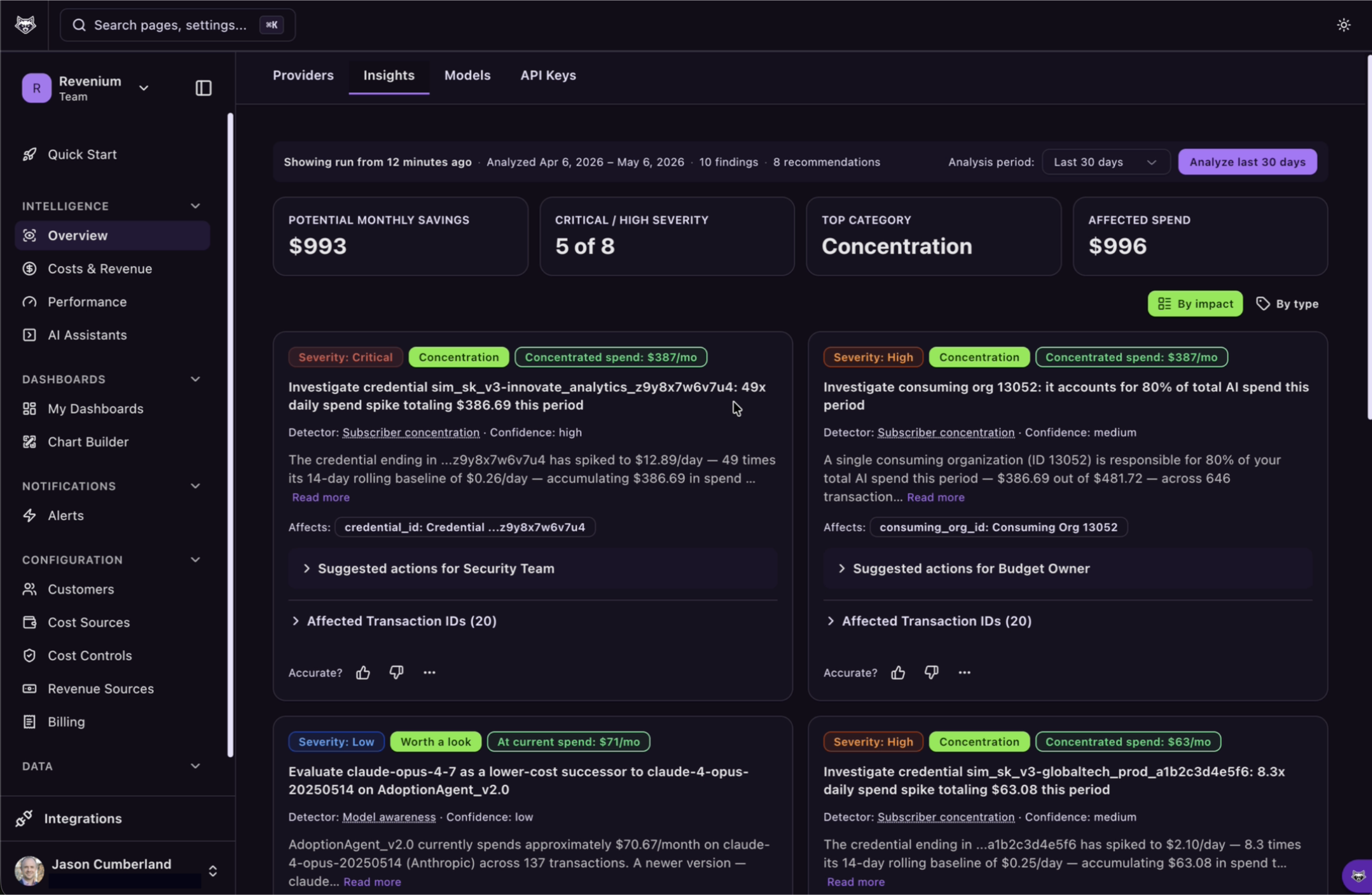
AI Insights gives customers a continuous, AI-driven cost analyst that scans AI usage, identifies waste and optimization opportunities, and quantifies recoverable spend in dollars.
Instead of dumping raw usage charts on a FinOps team that doesn’t exist, AI Insights turns your data into a prioritized punch list — ranked by impact — and points directly to the transactions that need fixing.
For example, in customer beta testing, AI Insights surfaced:
- Circular Agent Dependencies costing $1,125/month: a specific workflow caused a group of agents to ping-pong requests an average of 13x per execution, a pattern previously invisible to the clients’ engineers.
- An agent still running Claude 4 Opus at $750/month, providing a recommendation to migrate to 4.7 at 67% lower token pricing
- High mode-specific failure rates: a repeated workflow executing on OpenAI had a 40% higher failure rate than when the same workflow was run on Anthropic, leading to $2,300 / month in failed executions that could be reduced simply by preferring the more effective model for this workflow.
What you can do with AI Insights:
- Identify the highest-impact waste patterns across models, prompts, tools, and apps
- See estimated recoverable dollars (not just “interesting anomalies”)
- Jump straight from an insight to the underlying transactions to validate and remediate
2) Cost Controls (hard limits, enforced in real time)
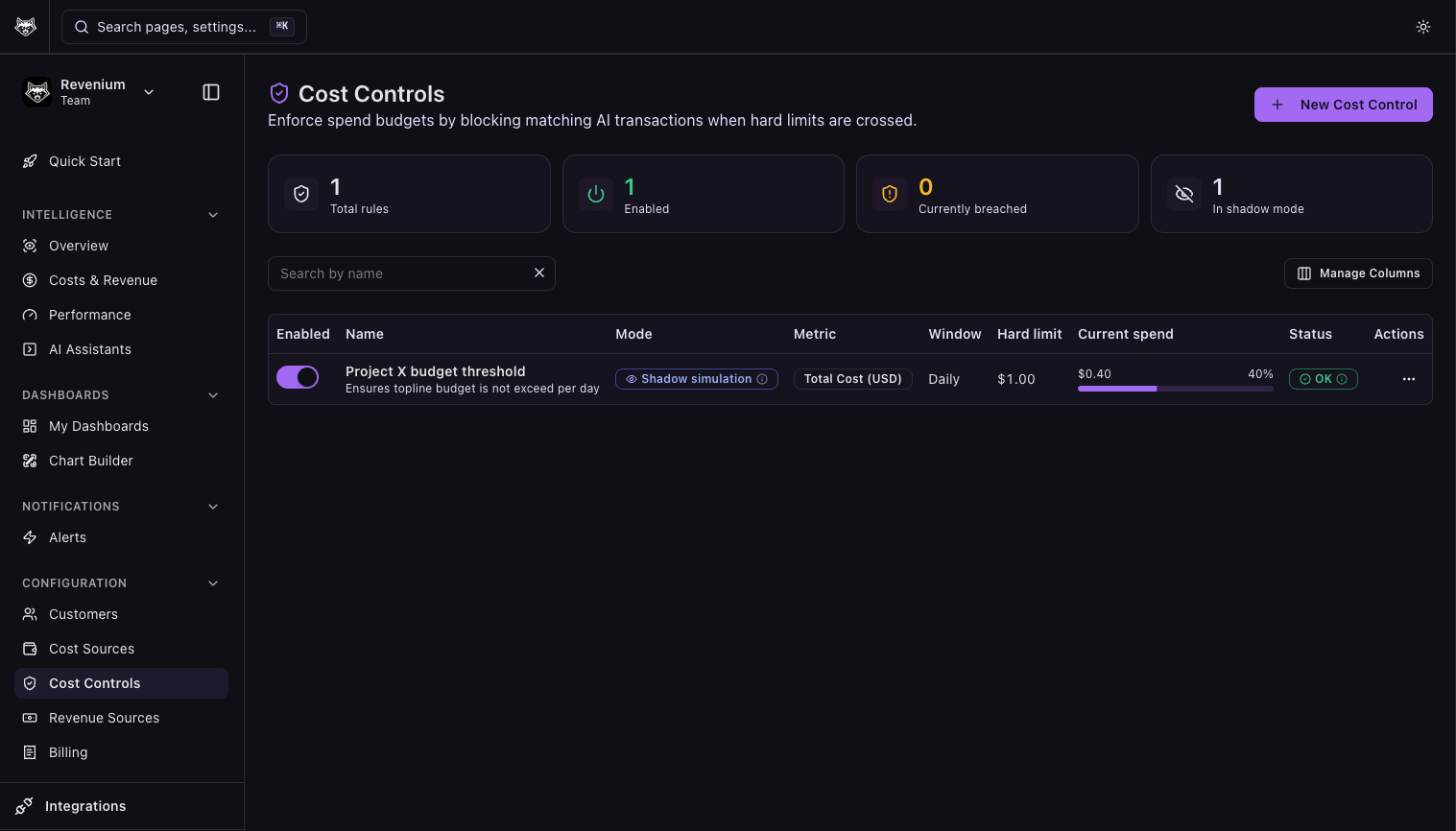
Customers can now enforce hard spend limits on AI usage in real time — blocking calls that would breach a budget before the money is spent, not after the fact.
Controls can be tested safely in preview mode first, so teams can validate rules without interrupting production traffic. When violations occur, route them to the Slack channels and webhook endpoints your team already uses.
Highlights:
- Real-time spend enforcement (block vs. alert)
- Preview mode for safe rollout
- Notifications via Slack + webhooks for existing operational workflows
3) AI Coding Productivity Analytics (ROI you can defend)
Engineering leaders can now answer the question: “Is our coding-assistant investment paying off?”
Revenium 2.12.0 adds AI coding productivity analytics with per-developer views, segmentation of power users vs. those who need onboarding help, and direct attribution from AI-assisted work to the pull requests that actually shipped.
A coding-assistant subscription stops being a black-box line item and becomes measurable ROI:
- Per-developer productivity views
- Performance + coaching insights (who’s getting value, who needs enablement)
- Attribution from AI-assisted work to shipped pull requests
4) Net AI Spend with provider credits (Bedrock + Vertex)
Customers running AI on AWS Bedrock or GCP Vertex now see their net spend after provider credits are applied.
This closes the gap between what Revenium dashboards show and what finance actually pays on the cloud bill — so engineering, finance, and the invoice finally match without manual reconciliation.
5) Revvy Onboarding Agent + CLI (time-to-first-data under an hour)
Customers can now instrument an AI application for Revenium through a conversation with their own agent — powered by Revvy — that can use the CLI to understand Revenium’s data model and auto-integrate metering in a single agent session.
Instead of hand-editing every AI call site, teams can go from “not instrumented” to “first data flowing” in under an hour.
The CLI also installs an optional CI check to automatically warn if any new AI call sites are introduced in a future PR without Revenium metering.
Check out the full changelog from this release on our docs site here: docs.revenium.io/changelog#id-2.12.0
Not using Revenium yet? Get started for free!