
Revenium's new Recommendations Engine analyzes your transaction history and hands engineering a ranked list of what to fix first, with the dollars at stake attached to every finding.
Today we're announcing AI Insights, a dedicated analytics surface that turns Revenium's transaction data into a list of prioritized cost-saving actions for eliminating AI waste. Each recommendation is grounded in your actual usage, tagged with severity and category, linked to the specific transactions that triggered it, and ordered by the monthly savings you stand to recover.
The problem we kept seeing
Enterprises running agents in production generate enormous volumes of usage data, and almost none of it gets read. The teams that could act on it are stretched thin, and raw dashboards rarely point to a useful fix. Patterns that quietly drain budgets, like an outdated model still running in production or a retry loop that bills the same prompt three times, sit scattered across transactions that nobody scans end-to-end.
A company running ten agents can still eyeball the bill. Push that to a thousand agents, and the waste compounds faster than any team can chase it down. That is the wall most AI programs are about to hit.
AI Insights closes the analysis gap. Revenium’s Recommendations Engine runs a multi-stage pipeline of detectors across dozens of dimensions of your usage, and returns a prioritized list of recommendations with a concrete suggested action, the affected entities, and a link to the transactions behind every finding.
What customer betas surfaced
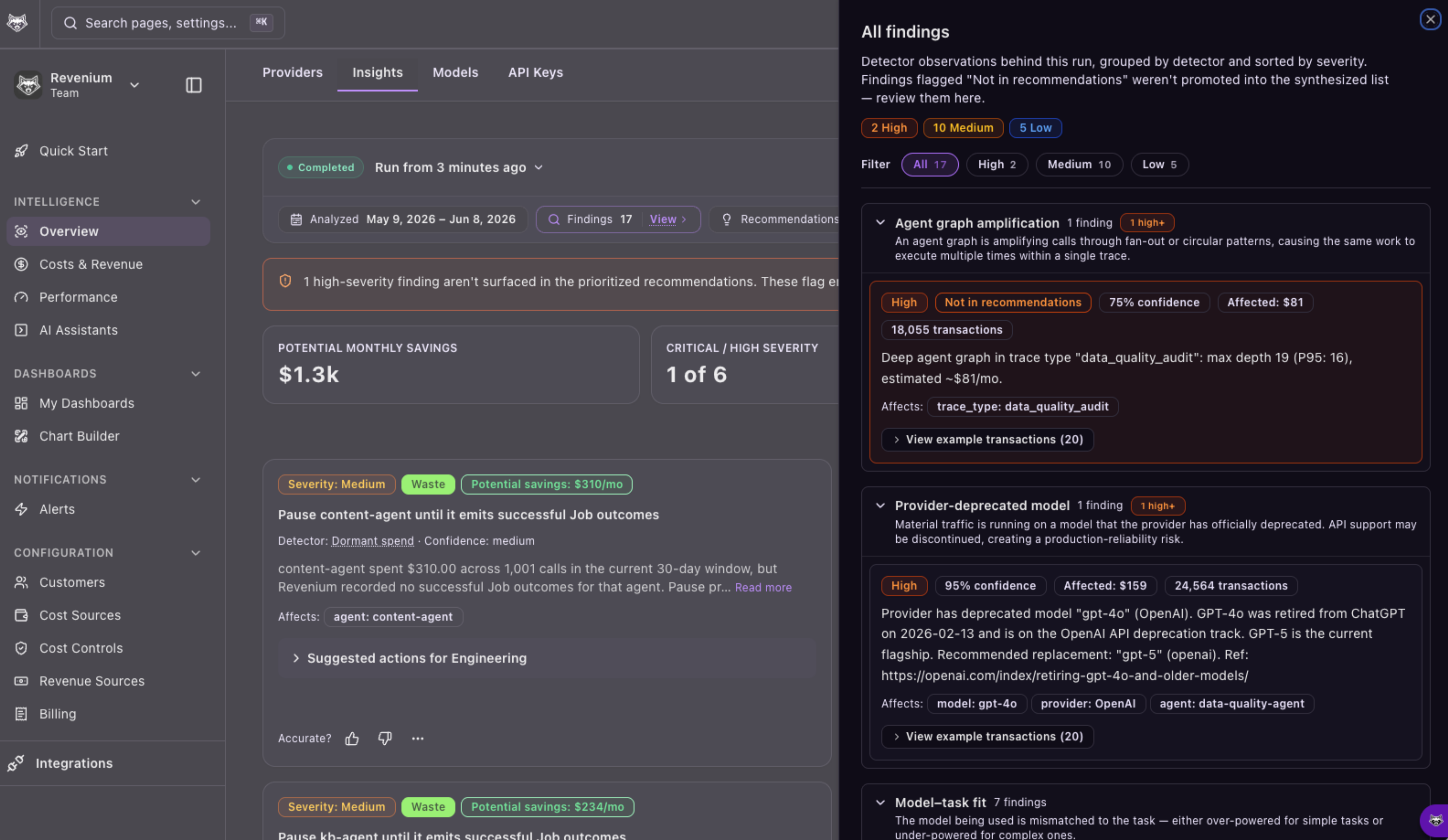
In beta testing, AI Insights flagged waste that had previously gone undetected:
- A group of agents passing requests back and forth an average of 13 times per execution, creating a costly circular dependency
- An agent still running on an older, more expensive model, where a recommended migration cut token pricing by 67%
- A 40% higher failure rate on one model provider versus another for the same workflow, accounting for thousands of dollars a month in failed executions that a routing change could reduce
Each finding came with the exact transactions that triggered it, so the engineer reviewing the recommendation could open a trace, confirm the pattern, and ship the fix.
How a run reads
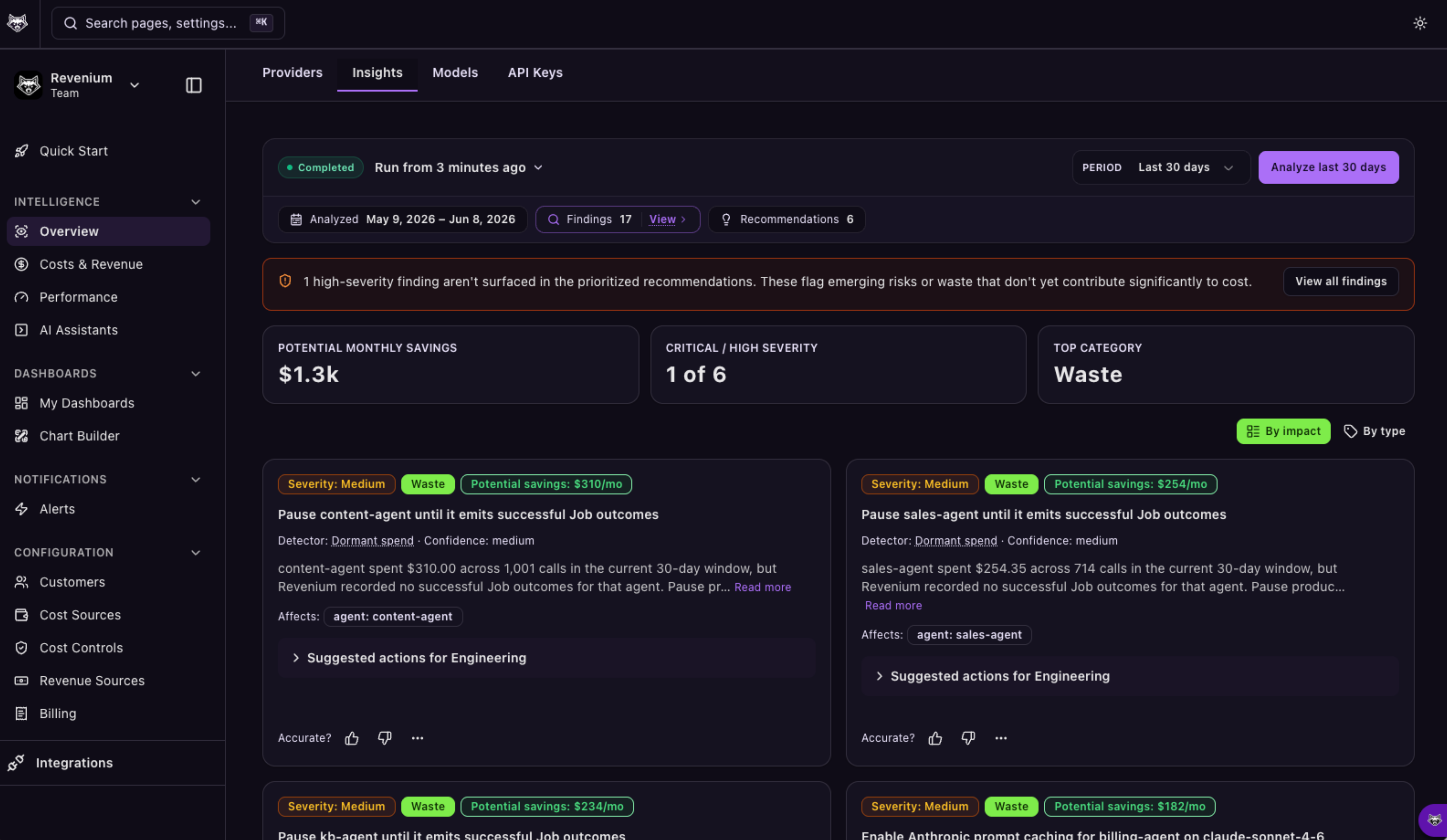
The Insights page opens with four summary cards at the top: Potential Monthly Savings, Critical/High Severity counts, the top-contributing category, and Affected Spend in the analyzed window. Below that is a ranked list of recommendation cards that can be viewed By impact (a single list across categories) and By type (grouped by category).
Every card shows:
- A severity badge (Critical, High, Medium, Low, Info) and a category badge (Waste, Concentration, Reliability, Efficiency, or Worth a Look)
- The estimated monthly impact in dollars (if non-zero)
- The detector that triggered the finding (for example, Error concentration or Outdated model)
- A plain-English explanation of what was detected and the agents, models, credentials, or subscribers implicated
- A Suggested action section with the specific change to make, whether that is swapping a model, adjusting a prompt, enabling a setting, or restructuring a flow
- Up to 20 sample transaction IDs, each with a one-click Open Trace into Trace Analytics for the full request path, latency breakdown, and downstream calls
Runs can be scoped to the past 1 day, 7 days, or 30 days, and past runs stay accessible from a history dropdown so you can compare findings over time.
The five categories of recommendations
- Waste: Spend you can eliminate without changing what the workload does. Enable a setting, upgrade to current-generation pricing, or stop redundant work. Success rate and capability stay the same.
- Concentration: A single subscriber, credential, agent, or model accounts for a disproportionate share of spend, errors, or exposure. Acting on these often unlocks downstream improvements even when the immediate dollar figure looks modest.
- Reliability: The workload is failing, retrying, or degrading at a rate that is itself the problem. Fix it, and the success rate climbs; cost usually drops as a side effect.
- Efficiency: The cost per successful completion is high relative to what the task warrants. Swap a model, rewrite a prompt, or restructure a flow to produce the same result for less.
- Worth a Look: Something notable you probably haven't seen yet, like a same-price newer model or a cost that grew faster than the usage driving it.
Underneath those categories, detectors span seven broad areas: configuration waste, failure-driven cost, concentration risk, cost-to-outcome misalignment, better alternatives available, unexpected growth, and attribution gaps.
Where it fits in practice
These are a few patterns that work well in practice:
- Incident triage. When an alert fires for a cost or error spike, run Insights on the last 1 day or 7 days to identify the root finding (for example error concentration, correlated error+retry, or throttling) without manual log diving.
- Fix configuration waste. Run Insights to surface Waste findings like outdated models or missed prompt caching, with the exact transactions behind each recommendation and an estimated monthly savings figure.
- Cut failure-driven spend. Reliability findings can highlight failure-driven cost patterns where fixing errors and retries raises success rate and usually drops cost as a side effect.
- Stop paying for incomplete answers. AI Insights can flag
max_tokenscutoffs where responses are truncated mid-thought while you still pay for the call. - Find dormant spend. AI Insights can surface subscribers or agents whose spend has gone largely dormant so you can clean up unused usage paths.
Built on the rest of the Economic Control System
AI Insights builds on the rest of Revenium's AI Economic Control System. Tool Registry, released in March, gave enterprises full-stack visibility into what AI agents spend, including the external API calls and human review steps that token-based monitoring misses. AI Outcomes tied that spend to business results and ROI at the workflow level. AI Insights works on top of both, finding the waste in production and attaching a recoverable dollar figure to it.
Also generally available today
Alongside AI Insights, several capabilities are reaching general availability:
- Cost Controls. Real-time hard spend limits that block budget-breaking calls before the money is spent, with a preview mode for safe rollout and alerts routed through Slack and webhooks.
- AI coding productivity analytics. Per-developer views that tie AI-assisted work to the pull requests that actually shipped, giving engineering leaders a defensible number for coding-assistant ROI.
- Net AI spend with provider credits. Spend views that account for AWS Bedrock and GCP Vertex credits, so Revenium dashboards match the cloud bill finance actually pays.
- Faster onboarding. Agent-powered onboarding and CLI that instrument an AI application in a single session, cutting time-to-first-data from days to under an hour.
Try it
AI Insights is included in every Revenium subscription at no additional cost, including the free developer tier.
Register for our webinar June 25th to see AI Insights live and get the playbook for turning findings into savings: https://www.revenium.ai/ai-insights-webinar