


Revenium Sidekick is now included in every paid Revenium plan at no extra cost. It brings AI cost visibility and budget controls into the tools engineers already use, so each person sees what their usage costs and the limits your company sets hold in every session.
The budget owners we talk to describe a familiar pattern. They see AI coding spend on a dashboard weeks after it’s spent, and the fixes left to them are moving everyone to cheaper models or putting hard caps on people and dealing with the interruptions. Both options cost them productivity, and the team members doing the most useful work feel it most.
Sidekick gives teams a way to manage that spend without slowing down. Team members see their own numbers where the cost is created, so they can change a costly habit in the moment. Budget owners get limits that warn first and can stop work once a budget is spent, and teams keep the models that make them fast.
What Sidekick does
Sidekick runs inside Claude Code and Claude Cowork and builds on Revenium’s existing tracking for both. Budgets are set once in Revenium Guardrails and apply in every session.
In Claude Code, Revenium Sidekick adds a status line under the prompt showing budget usage, conversation size, prompt cache state, and session cost so far. When a prompt is about to re-send an expired conversation at full price, Sidekick pauses Claude Code and shows a rough cost before anything is sent. Once a blocking budget is used up, Claude Code refuses the next prompt or tool call and explains why. In Claude Cowork, the cost checks appear as a note in Claude’s reply.
Seeing your own cost while you work
In Claude Code, a status line under every prompt shows usage against each of the person’s budgets and when each one resets, along with the size of the current conversation, the prompt cache state ,and the session cost so far. When reasoning effort is set above the model’s default, the status line shows that too. Budgets turn yellow as they near their limits, and conversation size does the same as a chat grows large.
The first session of each day opens with a "morning card" comparing yesterday’s conversation sizes with the person’s own 30-day average.
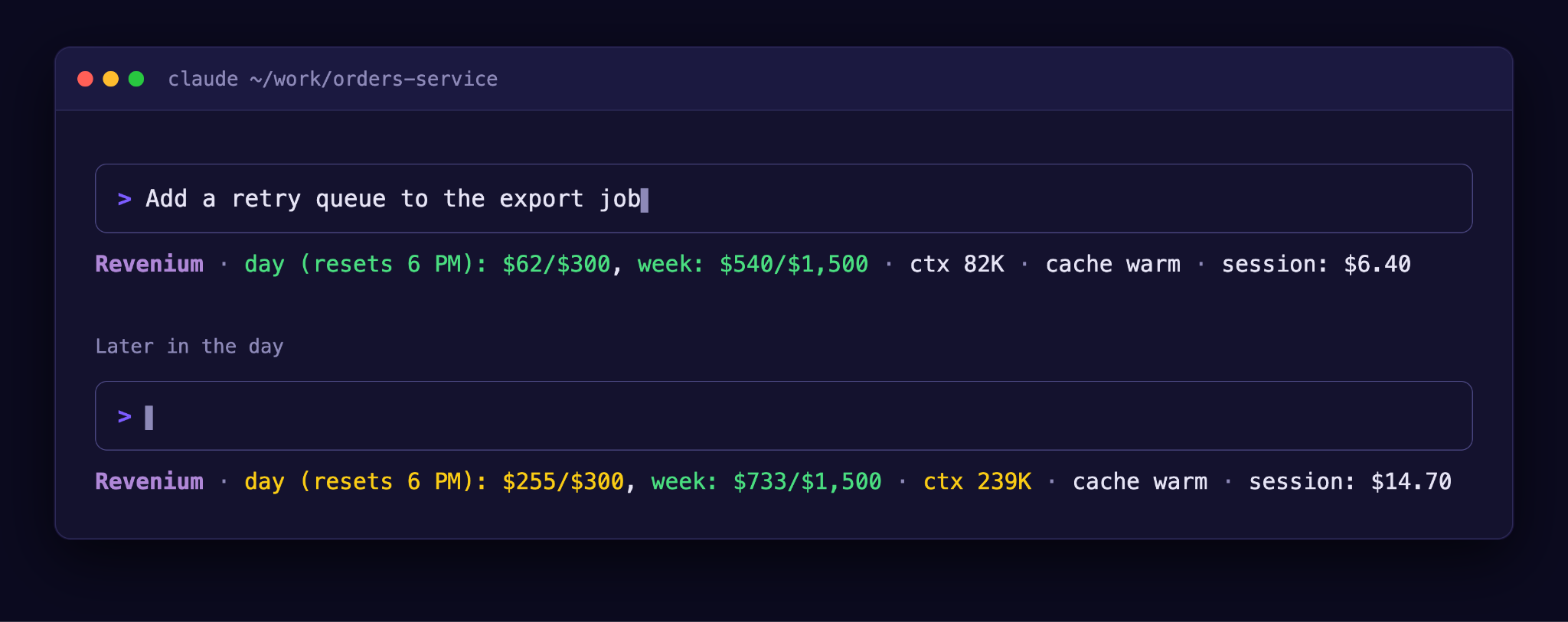
Catching costly habits as they happen
Returning to a long chat after its prompt cache has expired re-sends the whole conversation at full price, and it’s an easy moment to miss. Revenium Sidekick’s Cost Check pauses Claude Code at that moment, shows a rough cost and lets the engineer decide whether to continue. In Claude Cowork, the same check appears as a note in Claude’s reply.
Once a conversation has grown very large, the long-chat note suggests asking Claude for a handoff summary and starting a fresh chat. Sidekick also flags large context windows and effort levels above the vendor’s default. Team members keep the models that make them fast, and they see what their habits cost while they can still change them.
Budgets that warn first, then stop
Budgets can apply to an individual, a department or specific models, and each one only stops the work whose spend it counts. A budget for another tool, agent or key won’t block a developer.
As spend nears a budget’s early warning line, the person sees a warning and keeps working. When a budget set to block is used up, Claude Code refuses the next prompt or tool call and explains why, when the budget resets and what to do next.
New budgets can start in shadow mode. Revenium records each time a budget would have stopped work, so a team can watch a pilot group for a week before switching it live. Every message can carry your own tool name and wording, including who to contact for more budget.
Sidekick doesn’t prevent every overspend. If Revenium can’t be reached, work continues by default, and one setting changes that so calls are refused. In cloud Cowork, a budget filtered by product, organization or credential produces a note for the user without stopping work. On a locked-down network, the first plain chat turns of a new task can also spend before a check runs. The Sidekick docs cover these cases in detail.
I’ve said this on customer calls and I’ll say it here. If you’re willing to interrupt people’s work to save money, you can, and that decision is yours. Sidekick lets you make it one budget at a time.

Tying every session to its ticket
The ticket gate reads the ticket from the branch name or the prompt. When it can’t find one, Claude asks the developer, who can answer in plain words such as “this is for ENG-123.” Teams choose whether the gate only reminds developers or holds prompts until a ticket is linked. When a session is linked, its cost lands on that ticket, so a manager can see what the work cost without chasing anyone.
What budget owners see in Revenium
Spend by developer, team, and model appears on the Claude Code Dashboard. Budgets are set in Guardrails, Tickets shows what each linked ticket cost, and PR Health shows what each pull request cost.
With identity configured, each developer is named on their own usage from a single company-wide deployment on Amazon Bedrock, Google Vertex, Microsoft Foundry or an Anthropic API key. Setup Claude Code covers the identity requirements and exceptions, such as Claude Tag sessions that use a shared identity. One Sidekick settings page controls what developers see on the status line and the morning card.
Getting started with Sidekick
Engineers get their own numbers in the place they already work. Budget owners get limits that warn before they stop anyone, applied one budget at a time.
Existing customers can get Sidekick and its installation guides from their customer success manager. If you’re evaluating Revenium, our sales team can take you through a demo. The full details are on the Sidekick docs page, and Setup Claude Code covers the tracking setup that comes first.


